
Make your own cache tool - Redis cache by Nodejs
That sound crazy when you are trying to make a clone from Redis cache right? What is your thinking about it? How complexible it was? Where can I start it from? How can I access to the Ram memory with Nodejs to do that?
Be calm man, I’ll explain all of them into this blog. We do the Redis cache clone focusing to learn and understand ‘how it work?’, so don’t worry about the complexity. We do the simple one. Redis has a team to optimize it over 15 years so that is the thing you can not do that right now.
Why Redis cache important?
Ram is the one of the fastest memory that we can touch to. From speed perspective, you can see like:
CPU register (< 1 ns)
L1 cache (~1 ns)
L2 cache (~3-5 ns)
L3 cache (~10-20 ns)
Ram (main memory - ~50-100 ns)
Disk (NVMe ~10-100 μs, SSD ~50-500 μs)
Disk (HDD ~5-10 ms)
This is why Redis is more faster than database (running on disk). The cache hit reduce a significant decrese in time.
Understand redis cache not only how to use but also when to use it at the correct situation.
How the cache organized?
First of all, it’s not using like the normal http/https request. Redis cache using TCP connection to transfer directly under TCP/IP layer (at the level 4 of MSI model) that would help to transfer data fast and consistent.
The second thing is structured of the message. Redis Cahe using RESP protocol that allow parse/encode the data following the optimized structure.
There was 2 component that need to be implement:
-
Cache server: decode command, enforcing command.
-
Cache cli: connecting to the server, encode the command
Here’re some feature that we can focus on:
- SET: set cache value
- GET: get cache value
- DEL: delete cache value
- EXISTS: check existing value
- SET EX: set TTL
- TTL: check remaining TTL
- EXPIRE: force expire TTL
- INFO: return cache status
- LRU Eviction
- HSET: set hash value
- HGET: get hashed value
- INCR: increase counter (atomic)
- DECR: decrease counter (atomic)
- PUB/SUB
- SAVE
- AUTO Recovery
- Rate Limiter
I’ll divide the feature list into 7 parts:
- Setup cache server - cache cli
- Setup RESP encoding and parser
- Basic cache (SET, GET, DEL, EXISTS, TTL, SET EX, EXPIRE)
- Metric and hashing (INFO, LRU, HSET, HGET)
- Atomic (INCR, DECR)
- Queue (PUB/SUB)
- Recovery (SAVE, AUTO Recovery, Rate Limiter)
Lets make your hand dirty
1. Setup cache server - cache cli
Cache server is not express or fastify server. it build on net module (built-in nodejs). Net provide network API to buidl server-client through TCP or IPC.
After import net module, init the cache server following:
const net = require("net");

const server = net.createServer((socket) => {
  socket.on("data", (data) => {
    const blocks = data.toString();
    console.log(blocks);

    socket.write("+OK\r\n");
  });
});

server.listen(6379, () => {
  console.log("Server is listening on port 6379");
});
Init your redis cache client on the same way, it connect to the server through port 6379. The main difference here is the communication between the terminal to the redis cache client. Using readline to get the command from user:
import net from "net";
import readline from "readline";

const socket = net.createConnection({
  port: 6379,
  host: "localhost",
});

socket.on("data", (data) => {
  const response = data.toString();
  console.log(response);
});

const rl = readline.createInterface({
  input: process.stdin,
  output: process.stdout,
  prompt: "eric-redis> ",
});

rl.on("line", (input) => {
  rl.prompt();
  socket.write(input);
});
Connect to the redis cache server and sending user input.
2. Setup RESP encoding and parser
TCP does not have command concept. When sending data through TCP like ‘SET name Khanh Dang’ we actually dont know the correct name in this case whether is “Khanh” or “Khanh Dang”. RESP help to determine the protocol that help server and cli have on the same boat. Redis cache not just storing the text, they can also store the image by SET image ??? with the image stored to the cache.
For example, when client send “SET name Khanh Dang” RESP encode the data. Through TCP it looks like:
*3
$3
SET
$4
name
$10
Khanh Dang
Explain for that format:
*3 => data is array with 3 items
$3 => next property has 3 bytes
SET => value
$4 => next property has 4 bytes
name => value
$10 => next property has 10
Khanh Dang => value
At some special cases, normal string can not be convert to the correct format. For example:
SET profile {"name":"Khanh","city":"Da Nang"}By split with empty string it looks like:
["SET", "profile", '{"name":"Khanh","city":"Da', 'Nang"}'];At TCP level, it only see the data as:
53 45 54 20 70 72 6f 66 ...To address this, RESP only need to read exactly next 35 characters from the input, so the data be consistent. Here would be the data received from server:
*3
$3
SET
$7
profile
$35
{"name":"Khanh","city":"Da Nang"}
All the things you need to do just split the next 35 chars to get the fully values and dont care about the space inside.
We have the couple of parse and encode the data:
- Parse: make sure getting the data in the correct format.
const parseRESP = (blocks) => {
  const lines = blocks.split("\r\n");
  const command = lines[2].toUpperCase();
  const args = [];
  for (let i = 4; i < lines.length; i += 2) {
    args.push(lines[i]);
  }
  return { command, args };
};- Encode: tokenize the data before encodeRESP. make sure the user input following the correct format of RESP
function tokenize(input) {
  return input
    .match(/"([^"]*)"|[^\s]+/g)
    .map((token) => token.replace(/^"|"$/g, ""));
}

function encodeRESP(args) {
  let result = `*${args.length}\r\n`;
  for (const arg of args) {
    result += `$${Buffer.byteLength(arg)}\r\n`;
    result += `${arg}\r\n`;
  }
  return result;
}
3. Basic cache
SET, GET, DEL, EXISTS, TTL, SET EX, EXPIRE
After setup cache server, cache cli and the communication between cli and server to send and receive the command. This section will setup your basic cache command.
Before to jump into the command setup you need to understand how it works behind.
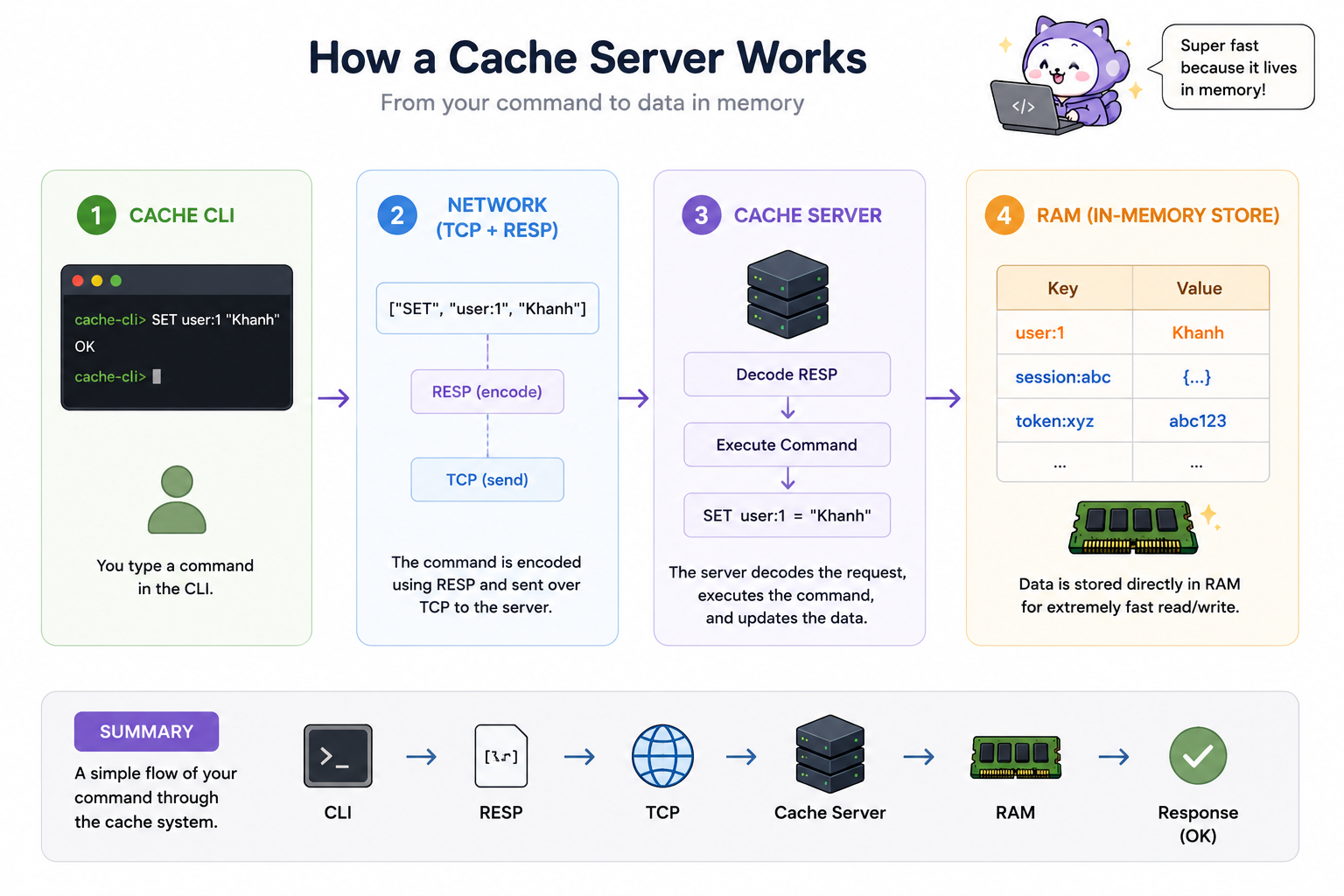
- SET vs GET
// Init the global value to store all data:
const storage = new Map();
After getting the command you must get the encoded data from the cache cli and check the supported command to make sure you hit the correct command:
const { command, args } = parseRESP(blocks);

switch (command) {
  case "SET":
    storage.set(args[0], args[1]);
    break;
  case "GET":
    const value = storage.get(args[0]);
    if (value !== undefined) {
      socket.write(`$${value.length}\r\n${value}\r\n`);
    } else {
      socket.write("$-1\r\n");
    }
    break;
}
Set your data to the global storage and let the system store it under the hood. You can get the “OK” message after set it successfully.
The GET command retrieve data from the storage and return to the cache cli immediately.
Test it:
4. Metric and hashing
INFO, LRU, HSET, HGET
5. Atomic
INCR, DECR
6. Queue
PUB/SUB
7. Recovery
SAVE, AUTO Recovery, Rate Limiter)